
Stay Independent:
Location-Tracking Smart Watch
24/7 support at home and on the go.
Monthly service
Including VAT
- Two-way speech through the watch
- Battery life typically 2–5 days, depending on use
- Connection to our 24/7 response centre

Tunstall
Help at the press of a button, at home or on the go. Speak to our UK response team through the watch, with location information to help coordinate support.
Choose your plan
Stay Independent:
24/7 support at home and on the go.
Monthly service
Including VAT
Only need help at home?
24/7 support at home, with the option to add more devices to suit your needs.
Monthly service
Including VAT
Prices are shown for the selected billing period. Optional extras and engineer installation are itemised in checkout. Read the terms.
Stay Independent
Keep the watch charged. Mobile reception, location accuracy and battery life depend on use and surroundings.
Fall detection cannot detect every fall. Use the manual alarm button when you can.
Stay Safe
Fall detection cannot detect every fall. Press the alarm button whenever you need help and can do so.
Home coverage and setup must be checked before you rely on the service.
How it works
The Ally watch can raise a fall alert outdoors, with location information to help our response team coordinate support.
A fall is detected while you are out
If Ally recognises a fall, it can raise an alert automatically. You can also press the watch’s alarm button whenever you need help and are able to do so.
The watch sends an alert and location information
With suitable mobile coverage and a charged watch, the alert can reach our 24/7 response centre. Available GPS location information helps the team understand where you are; accuracy depends on signal and surroundings.
An operator responds through the watch
The operator tries to speak with you through Ally’s microphone and speaker, uses available location information and assesses what has happened.
Help is arranged where you are
The operator uses the situation, available location information and your service contacts to arrange appropriate help. This can involve nominated contacts or emergency services where needed, depending on the circumstances.
No fall detector detects every fall. Press your alarm button whenever you need help and are able to do so. Help is arranged according to the situation; emergency services are contacted when appropriate. No fixed attendance time is promised. The watch needs suitable mobile coverage; location accuracy varies with signal and surroundings.
Ally by Tunstall
Independence doesn’t stop at the front door. Ally connects to our UK response centre with real people ready to respond.

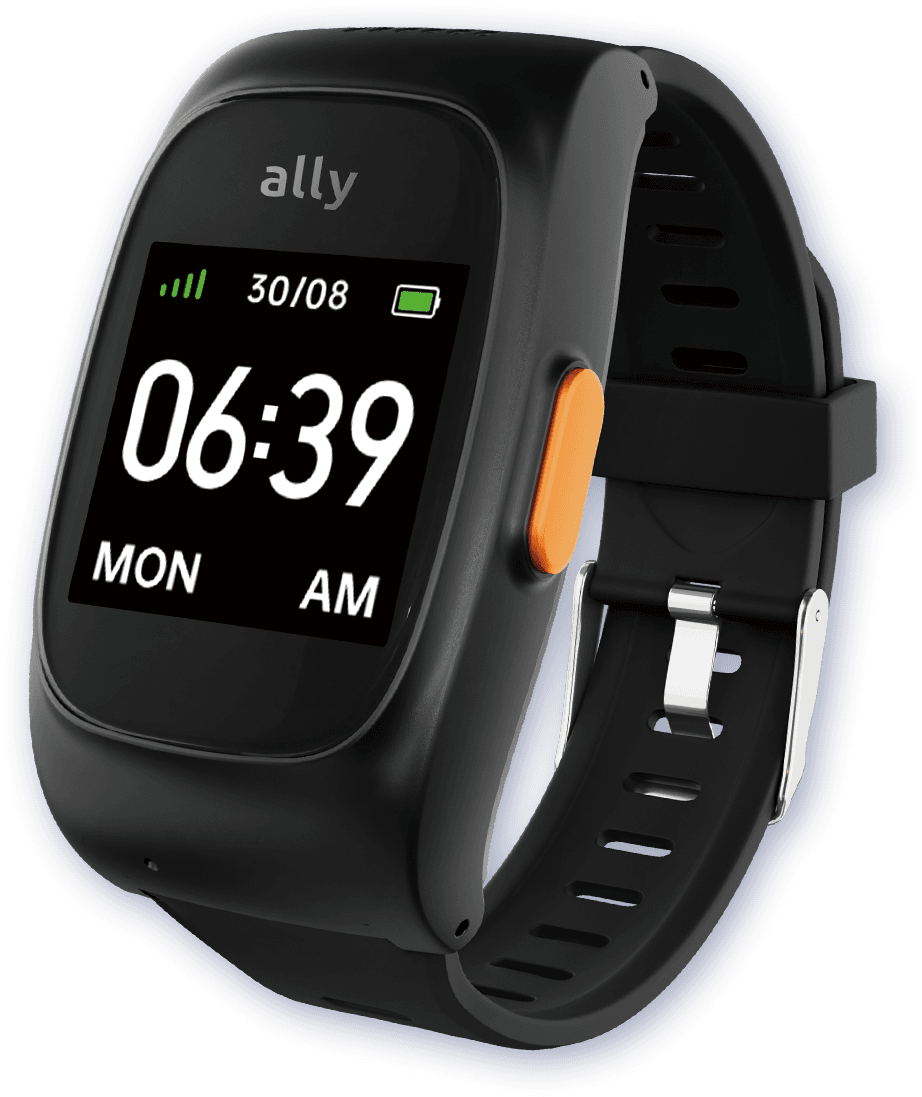
Ally brings an alarm button, microphone and speaker together in a familiar watch format. Its orange button provides a way to speak with our response team. The screen shows the time, day and date, with battery and mobile-signal indicators.
Location accuracy and connectivity depend on suitable mobile signal and surroundings. Follow the supplied charging and care instructions. Automatic fall detection cannot detect every fall. Press your alarm button whenever you need help and are able to do so. Wear, charge and connect your equipment as instructed.
The Ally app supports location information, alerts, activity and device status for authorised users. Access is managed through service permissions, so location information is shared only with people who have been given access.
The Ally app is separate from the forthcoming Tunstall family app. Being the payer or a nominated contact does not automatically give someone app access. Your nominated contacts can still be recorded for the response team without using an app.
Follow the supplied charging instructions and choose a routine that works for the person wearing the watch.
Mobile signal, alerts, location features and other use affect battery life. A published typical duration is not a guaranteed charging interval.
Consider how the person will ask for help while the watch is being charged or is not being worn.
Support to suit you
Stay safe and independent with fall detection and location tracking technology. Our UK-based response team is 24/7 to provide reassurance and coordinate the help you need.
| Feature | Wearable falls detector | Location-tracking smart watch |
|---|---|---|
| Monthly price | £23.94 (inc. VAT) | £32.40 (inc. VAT) |
| Set up | £42 | £42 |
| Cancellation | Monthly: one month’s written notice. Annual: end of the service year or applicable minimum term. Read the terms. | Monthly: one month’s written notice. Annual: end of the service year or applicable minimum term. Read the terms. |
| Fall detection | ✓ | ✓ |
| GPS option | ✓ | |
| Response centre | Yorkshire, UK | Yorkshire, UK |
| Tunstall family app | Coming soon | Coming soon |
Support to suit you
Choose equipment for where it will be used and how the person prefers to wear it.
| Feature | Stay Safe | Stay Independent |
|---|---|---|
| Equipment | Lifeline Digital home unit and a wearable fall detector | Ally alarm watch |
| Where it is used | At home, within the equipment’s checked coverage | At home and away, with suitable mobile coverage |
| Wear style | A separate wearable alarm used with the home unit; follow its fitting instructions | Watch worn on the wrist |
| Requesting help | Manual alarm button and automatic fall alerts | Watch alarm button and automatic fall alerts |
| Speaking with the operator | Through the home unit | Through the watch microphone and speaker |
| Location | The registered service address | Location sharing, subject to signal and surroundings |
| Power and charging | Keep the home unit plugged in and follow the wearable’s care instructions | Charge the watch regularly and follow its care instructions |
| Family access | Nominated contacts are recorded for the response team; the Tunstall family app is coming soon. | Location and app access are managed through service permissions; being a nominated contact does not automatically give access. |
| Monthly service and first payment | £65.94 first payment, including £42 setup and the first month; then £23.94 per month including VAT | £74.40 first payment, including £42 setup and the first month; then £32.40 per month including VAT |
| Annual service and first payment | £257.46 first payment, including £42 setup and the first year; then £215.46 per year including VAT | £294.72 first payment, including £42 setup and the first year; then £252.72 per year including VAT |
| Cancellation terms | Monthly service: one month’s written notice. Annual service: notice takes effect at the end of the current service year or minimum term. Review the full terms, including cancellation rights, before ordering. | Monthly service: one month’s written notice. Annual service: notice takes effect at the end of the current service year or minimum term. Review the full terms, including cancellation rights, before ordering. |
Automatic fall detection cannot detect every fall. Press your alarm button whenever you need help and are able to do so. Wear, charge and connect your equipment as instructed.
Customer information
No separate phone is needed for an alarm call: Ally has its own microphone and speaker, so you can speak directly to the response team through the watch. It needs a charged battery and suitable mobile coverage. App features use separate access permissions.
Ally works at home and away where there is suitable mobile coverage. Buildings, surrounding conditions and signal strength can affect reception and location accuracy, so coverage is not guaranteed in every location. Keep the watch charged and consider the places you regularly visit when choosing your alarm.
Ally is IP67 water and dust resistant. Follow its care instructions for water exposure; the rating does not make it suitable for swimming or every water activity.
Ally supports safe-zone alerts when configured. A safe zone is a set boundary that can trigger an alert if the wearer moves beyond it. Access to these settings is controlled, and location updates depend on a working connection. A safe zone is an extra alert feature, not a physical boundary or a guarantee that someone cannot become lost.
Stay on the call and tell the operator that you are safe and the alert was accidental. The team can check that help is not needed. Do not ignore an answered alarm because it was raised by mistake.
Choose from the delivery and setup options available when you order. Self-setup includes phone support, and an engineer visit is available in supported areas. Any installation charges are shown before payment; smoke-detector pairs require engineer installation. Provide the service user’s details and nominated contacts, follow the setup instructions and complete an alarm test once monitoring is ready. Our team can help with delivery dates and appointments.
Contact our service team, explain which device is affected and have your customer reference available if possible. Ask about a replacement, any charge and the expected timescale before agreeing to proceed. The reason for replacement and your contract affect the arrangements. Discuss how to obtain help while the equipment is unavailable, and do not rely on a damaged device as though it has been checked.
Ally is a wrist-worn alarm with a manual SOS button, automatic fall alerts, location technology and a built-in microphone and speaker. You can speak to the response team through the watch without a separate phone for the alarm call.
The watch needs a charged battery and suitable mobile coverage. Location and safe-zone features depend on service settings and authorised access. Health and activity information is not a medical diagnosis. Read the Ally product information and follow the care instructions supplied with your watch.
Ask about the equipment, setup or choosing for someone else. Leave your name and number for a sales callback.
0330 123 3303For sales and service enquiries. Alarm response is available 24 hours a day, seven days a week.